
Age Calculation for Legal and Official Documents
Learn how to calculate age accurately for legal documents, official forms, and compliance requirements. Ensure precise age verification every time.
Read articleChronoCalc is a free suite of clinical age tools for scoring assessments and tracking development. Start with the chronological age calculator for exact years, months, and days — including SLP-ready Y;M;D format — then branch into test age, adjusted age, and gestational age calculators.
Chronological Age:
We built ChronoCalc because we got fed up with calculators that couldn't handle the basics. Whether you need a quick age check or a formatted result for a formal assessment, we've got a tool that actually works.
Our main chronological age calculator — exact years, months, and days. Handles leap years like a pro and switches between standard and clinical rounding modes.
Built specifically for test age formatting. Pick your assessment publisher and get results ready to drop straight into your report.
Figure out corrected age for premature babies by knocking off the weeks of prematurity. Every NICU nurse and developmental pediatrician we know uses this regularly.
Want to know how to calculate chronological age by hand? We break down the borrowing method with real examples that make sense.
Grab our copy-paste chronological age calculator Excel formulas — DATEDIF, YEARFRAC, and more. Perfect when you've got a spreadsheet full of birth dates.
Need age in total months, exact days, or weeks? We've got dedicated calculators for each. Handy for legal docs and detailed developmental tracking.
Different publishers want age formatted differently. These chronological age calculators handle the specifics so you don't have to memorize rounding rules.
Learn how to calculate age accurately for legal documents, official forms, and compliance requirements. Ensure precise age verification every time.
Read articleLearn how occupational therapists calculate and use chronological age for pediatric assessments, treatment planning, and developmental goal setting.
Read articleCopy-paste Excel formulas to calculate chronological age from date of birth. Learn DATEDIF, YEARFRAC, and nested functions for bulk age calculation.
Read articleUnderstand the borrowing method used by professionals for precise age computation.
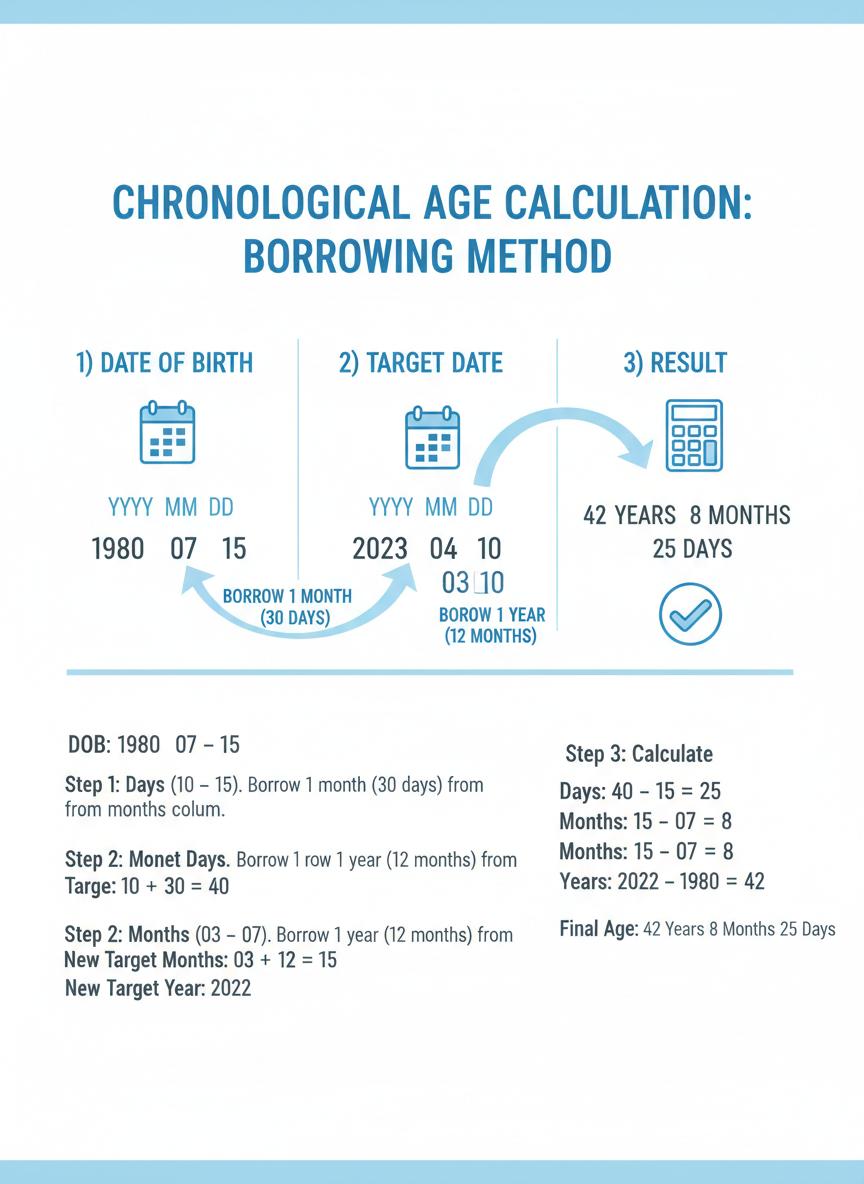
The borrowing method subtracts birth date from target date, borrowing from higher units when needed.
We made this because we were frustrated. Now thousands of SLPs, school psychs, and OTs use it every day.
We use the same borrowing method that Pearson, BRIGANCE, and WISC specify in their manuals. Leap years, 31-day months, February — it all gets handled correctly.
Nothing leaves your browser. Seriously — we don't have a server that sees your data. That's why clinicians in HIPAA-covered settings can use this without a second thought.
One click copies results to your clipboard. Hit print and you get a clean, formatted report you can actually attach to clinical documentation.
It's date subtraction with a twist — when the day count is too small, you borrow from the month. When the month count is too small, you borrow from the year. Our calculator does the heavy lifting.
Chronological age is straightforward — it's how many calendar days have passed since birth. Biological age is fuzzier; it's about how your body is actually aging, and that can be way different from what your birth certificate says.
SLPs need chronological age calculators that spit out results in the right format for their publisher's manual. Our test age calculator handles Pearson, BRIGANCE, WISC, and Super Duper — just pick one and go.
Plug the birth date and testing date into our Pearson calculator. You'll get results formatted the way the WISC-V manual wants them — rounding rules included.
Adjusted age takes the weeks of prematurity and knocks them off the chronological age. Our adjusted age calculator handles the math if you know the gestational age.
Absolutely. Our BRIGANCE calculator gives you exact age — no rounding — exactly how the BRIGANCE Early Childhood Screen III wants it.
Interactive demo, printable cheat sheet, and clinical guides — no video ads, no signup.
Feedback from speech-language pathologists, school psychologists, neonatologists, and occupational therapists who use ChronoCalc in daily practice.
"I pull up ChronoCalc before every eval. It is faster than the old Pearson tool ever was, and the copy-to-clipboard feature means I am not retyping ages into reports. Small thing, huge time saver."
Sarah M., CCC-SLP
Speech-Language Pathologist
Pediatric outpatient clinic
"The clinical mode on the test age calculator matches WISC-V rounding rules I checked against the administration manual. That is the kind of verification I need before I trust a tool with real scores."
James R., PsyD
School Psychologist
Public school district
"We use the gestational age calculator for resident training. PMA output, prematurity categories, corrected age — clear enough that families can follow along too."
Emily C., MD
Neonatologist
Level III NICU
"Finally — a free age calculator that does not make me second-guess the results. Cumulative months output is exactly what PDMS-2 scoring needs, and print reports look clean enough for clinical notes."
Amanda F., OTR/L
Pediatric Occupational Therapist
Private practice
"BRIGANCE had their own calculator, then it disappeared after a site redesign. This one gives exact age — no rounding — and has become our go-to for early childhood screens."
Michael T., PhD
Clinical Psychologist
University psychology clinic
"Families love the adjusted age calculator for premature babies. It helps them understand corrected age vs chronological age without needing a lecture."
Lisa P., RN, BSN
NICU Nurse Navigator
Children's hospital NICU
Clinical
Borrowing method
Y;M;D
Score-sheet format
100%
Free forever
Grab our printable Age Calculation Quick Reference Card. We crammed the borrowing method, leap year rules, month lengths, Excel formulas, and publisher rounding conventions onto one page. Tape it to your desk, stick it in your assessment kit — whatever works.
Download PDF Reference Card6,100 bytes | 1 page | Print-friendly format
Tired of switching tabs mid-evaluation? Our Chrome extension calculates age from any webpage you're on — one click, result's on your clipboard. Free, no data collection, no nonsense.