
Chronological Age Calculator
Free chronological age calculator for exact years, months, and days — plus SLP-ready Y;M;D semicolon format you can paste into CELF, WISC, and WIAT score sheets. Includes cumulative months, clinical rounding mode, and one-click copy/print. Leap years and month-length borrowing are handled correctly.
Enter Date Details
Your Results
Chronological Age
-
Years
-
Months
-
Days
Score sheet format (Y;M;D)
-
Clinical Mode: Age rounded per standard assessment protocols. Verify against specific publisher guidelines (Pearson, BRIGANCE, etc.).
Enter dates and click Calculate to see results
100% Accurate
Leap-year aware calculation
Privacy Protected
No data leaves your device
Print & Copy
Export results instantly
Clinical Standard
Used by SLPs & psychologists
Note for Clinicians & Educators
Heads up — this tool gives you chronological age only. It does not compute corrected or gestational age for preemies. If you're working with a premature infant, check your assessment manual (whether you follow Pearson or BRIGANCE protocols) and use our adjusted age calculator instead.
What Is Chronological Age?
Chronological age is the exact calendar time between a person's birth date and a target date, expressed in years, months, and days. It is the fixed, objective measurement used by standardized tests like CELF-5, WISC-V, and WIAT-4 to assign children to normative age bands. Unlike biological age or developmental age, it is purely mathematical and based solely on calendar dates.
How Do You Write Chronological Age on Assessment Forms?
Chronological age is written as Y;M;D on most North American assessment score sheets. For example, a child who is 9 years, 4 months, and 7 days old is recorded as 9;04;07. This semicolon format is required by CELF-5, WIAT-4, and Vineland-3 scoring manuals (WISC-V typically uses Y;M after rounding). Always use two digits for months and days (04, not 4) to prevent transcription errors. ChronoCalc shows Y;M;D after every calculation with one-click copy.
How to Calculate Chronological Age for a Test
Subtract the birth date from the testing date using the borrowing method: if the test day is smaller than the birth day, borrow days from the previous month; if months are negative, borrow 12 months from the year. For example, a child born June 15, 2015, tested February 5, 2024, is 8 years, 7 months, and 20 days old (8;07;20). Use the testing date, not today's date, to ensure correct norm table selection.
Assessment Tool Age Format Matrix
Different publishers want different formats. Use this matrix to pick ChronoCalc mode before you score:
| Assessment | Publisher | Age Format | Age Range | ChronoCalc Mode |
|---|---|---|---|---|
| CELF-5 | Pearson | Y;M;D | 5;0 – 21;11 | SLP / Standard |
| WISC-V | Pearson | Y;M | 6;0 – 16;11 | Clinical |
| WIAT-4 | Pearson | Y;M;D | 4;0 – 50;11 | SLP / Standard |
| BASC-3 | Pearson | Y;M | 2;0 – 21;11 | Clinical |
| PPVT-5 | Pearson | Y;M;D | 2;6 – 90+ | SLP / Standard |
| GFTA-3 | Pearson | Y;M;D | 2;0 – 21;11 | SLP / Standard |
| Brigance IED | Curriculum Associates | Y;M;D | 0;0 – 7;11 | Exact (no round) |
| Vineland-3 | Pearson | Y;M;D | 0;0 – 90+ | SLP / Standard |
Always verify rounding rules in the current administration manual. For publisher-specific workflows see CELF-5, WISC-V, and the Pearson alternative page.
How to Use This Calculator
Enter date of birth, enter the testing/target date (or leave blank for today), choose Standard or Clinical mode, then Calculate. Copy Y;M;D for score sheets, or Print Report for the file.
Verify By Hand (Interactive Proof)
Any clinician who has made an age error mid-eval knows the pit-of-the-stomach feeling. Use this walkthrough after you calculate above — it shows the borrowing steps for the dates you entered.
The Borrowing Method Explained
When the test day is smaller than the birth day, borrow from the month column using the actual number of days in the previous month — not a flat 30. When months go negative, borrow 12 months from the year. That is the same logic Pearson, BRIGANCE, and clinical manuals specify.
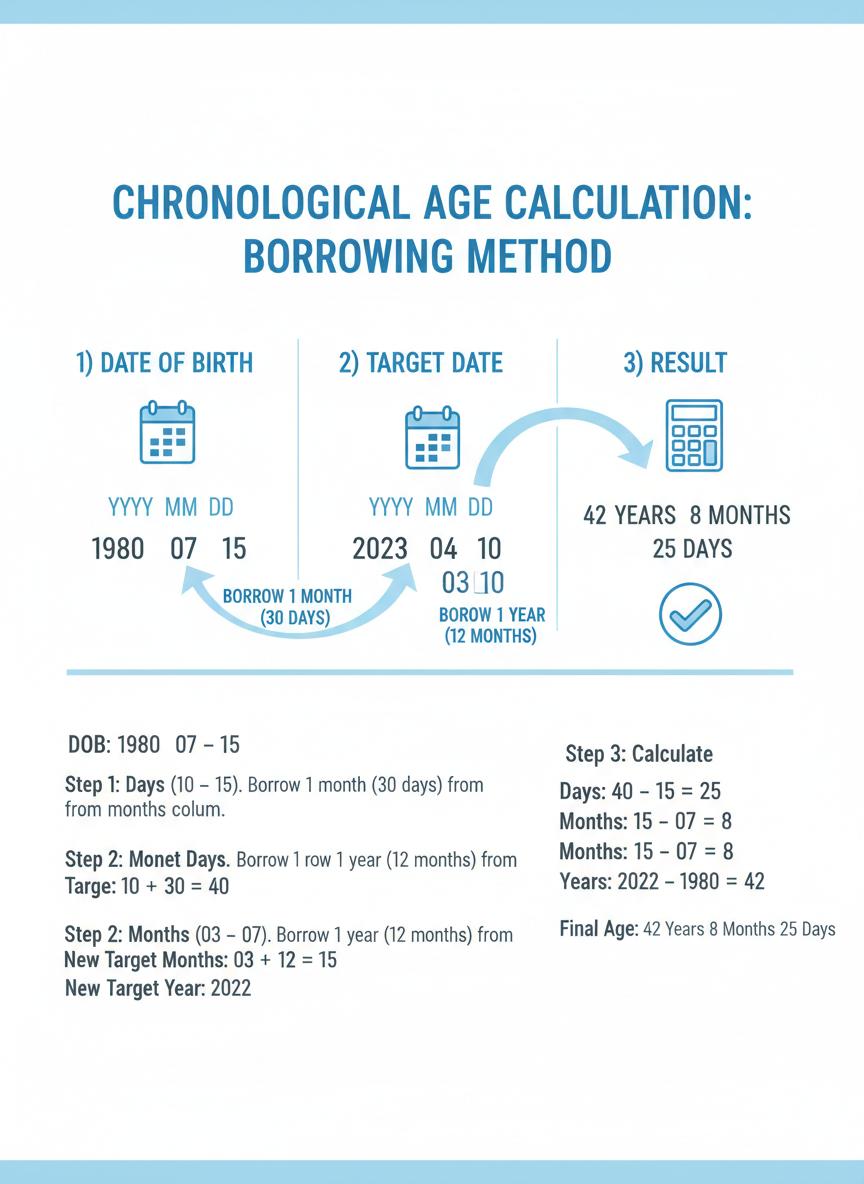
Worked example: born November 28, 2014; tested January 15, 2026. Days need a borrow from December (31 days) → 18 days. Months need a year borrow → 1 month. Years → 11. Result: 11 years, 1 month, 18 days (11;01;18).
Who Uses This Calculator (Use Cases)
- Education / SLP evals: CELF-5, GFTA-3, PPVT-5 score sheets need exact Y;M;D before norms.
- School psychology: WISC-V / KTEA age bands change with a single month of error.
- Child development / EI: Cumulative months matter more than “8 years old” for early intervention eligibility.
- NICU / pediatrics: Pair chronological age with corrected age for premature infants.
- Legal / school cutoffs: District cutoff dates and documentation need calendar-precise age.
Why We Built This Tool
Pearson officially stated they “no longer have a live age calculator on our site.” BRIGANCE tools have also vanished through redesigns. We built ChronoCalc as the free, privacy-first replacement we actually use during clinical evaluations — with Y;M;D copy and no ad maze. Full migration notes: Pearson age calculator alternative.
Tips From the Eval Room
- Lock the testing date before you touch DOB. A child evaluated three days before a birthday can jump age bands if you accidentally use today.
- Copy Y;M;D once, then verify against the report header. Most transcription errors happen between calculator and score sheet — not in the math.
- February 29 needs a manual check. CELF-5 and WISC-V can treat non-leap years differently. Do not assume.
- Preemies need two ages. Chronological age for some forms; corrected age for developmental interpretation up to ~24 months. See the corrected age guide.
Related Age Calculation Tools & Guides
Interactive Demo
Calculate → copy Y;M;D → paste into a mock score sheet
CELF-5 Age Calculator
Y;M;D workflow for CELF score sheets
WISC-V Age Calculator
Clinical Y;M rounding for Wechsler norms
Pearson Alternative
What to use after Pearson shut down their tool
IEP Documentation
Template language for evaluation reports
School Age Cutoffs
Use district cutoff dates as the target date
Age in Months Guide
Why 99 months beats “8 years old”
Printable Cheat Sheet
Borrowing rules + publisher formats on one page